⭐ 564 Stars
🍴 65 Forks
👀 564 Watchers
TypeScript
| GitHub 链接 | https://github.com/rohunvora/x-research-skill |
|---|---|
| 项目简介 | X/Twitter research skill for Claude Code and OpenClaw. Agentic search, thread following, deep-dives, sourced briefings. |
| 创建时间 | 2026-02-08 |
| 更新时间 | 2026-02-11 |
📖 README
English
# x-research
X/Twitter research agent for [Claude Code](https://code.claude.com) and [OpenClaw](https://openclaw.ai). Search, filter, monitor — all from the terminal.
## What it does
Wraps the X API into a fast CLI so your AI agent (or you) can search tweets, pull threads, monitor accounts, and get sourced research without writing curl commands.
- **Search** with engagement sorting, time filtering, noise removal
- **Quick mode** for cheap, targeted lookups
- **Watchlists** for monitoring accounts
- **Cache** to avoid repeat API charges
- **Cost transparency** — every search shows what it cost
## Install
### Claude Code
```bash
# From your project
mkdir -p .claude/skills
cd .claude/skills
git clone https://github.com/rohunvora/x-research-skill.git x-research
```
### OpenClaw
```bash
# From your workspace
mkdir -p skills
cd skills
git clone https://github.com/rohunvora/x-research-skill.git x-research
```
## Setup
1. **X API Bearer Token** — Get one from the [X Developer Portal](https://developer.x.com)
2. **Set the env var:**
```bash
export X_BEARER_TOKEN="your-token-here"
```
Or save it to `~/.config/env/global.env`:
```
X_BEARER_TOKEN=your-token-here
```
3. **Install Bun** (for CLI tooling): https://bun.sh
## Usage
### Natural language (just talk to Claude)
- "What are people saying about Opus 4.6?"
- "Search X for OpenClaw skills"
- "What's CT saying about BNKR today?"
- "Check what @frankdegods posted recently"
### CLI commands
```bash
cd skills/x-research
# Search (sorted by likes, auto-filters retweets)
bun run x-search.ts search "your query" --sort likes --limit 10
# Profile — recent tweets from a user
bun run x-search.ts profile username
# Thread — full conversation
bun run x-search.ts thread TWEET_ID
# Single tweet
bun run x-search.ts tweet TWEET_ID
# Watchlist
bun run x-search.ts watchlist add username "optional note"
bun run x-search.ts watchlist check
# Save research to file
bun run x-search.ts search "query" --save --markdown
```
### Search options
```
--sort likes|impressions|retweets|recent (default: likes)
--since 1h|3h|12h|1d|7d Time filter (default: last 7 days)
--min-likes N Filter minimum likes
--min-impressions N Filter minimum impressions
--pages N Pages to fetch, 1-5 (default: 1, 100 tweets/page)
--limit N Results to display (default: 15)
--quick Quick mode (see below)
--from <username> Shorthand for from:username in query
--quality Pre-filter low-engagement tweets (min_faves:10)
--no-replies Exclude replies
--save Save to ~/clawd/drafts/
--json Raw JSON output
--markdown Markdown research doc
```
## Quick Mode
`--quick` is designed for fast, cheap lookups when you just need a pulse check on a topic.
**What it does:**
- Forces single page (max 10 results) — reduces API reads
- Auto-appends `-is:retweet -is:reply` noise filters (unless you explicitly used those operators)
- Uses 1-hour cache TTL instead of the default 15 minutes
- Shows cost summary after results
**Examples:**
```bash
# Quick pulse check on a topic
bun run x-search.ts search "BNKR" --quick
# Quick check what someone is saying
bun run x-search.ts search "BNKR" --from voidcider --quick
# Quick quality-only results
bun run x-search.ts search "AI agents" --quality --quick
```
**Why it's cheaper:**
- Prevents multi-page fetches (biggest cost saver)
- 1hr cache means repeat searches are free
- Noise filters mean fewer junk results in your 100-tweet page
- You see cost after every search — no surprises
## `--from` Shorthand
Adds `from:username` to your query without having to type the full operator syntax.
```bash
# These are equivalent:
bun run x-search.ts search "BNKR from:voidcider"
bun run x-search.ts search "BNKR" --from voidcider
# Works with --quick and other flags
bun run x-search.ts search "AI" --from frankdegods --quick --quality
```
If your query already contains `from:`, the flag won't double-add it.
## `--quality` Flag
Filters out low-engagement tweets (≥10 likes required). Applied post-fetch since `min_faves` isn't available as an X API search operator.
```bash
bun run x-search.ts search "crypto AI" --quality
```
## Cost
As of February 2026, the X API uses **pay-per-use pricing** with prepaid credits. No subscriptions, no monthly caps. You buy credits in the [Developer Console](https://console.x.com) and they're deducted per request.
**Per-resource costs:**
| Resource | Cost |
|----------|------|
| Post read | $0.005 |
| User lookup | $0.010 |
| Post create | $0.010 |
**Search cost:** Each search page returns up to 100 posts = ~$0.50/page.
| Operation | Est. cost |
|-----------|-----------|
| Quick search (1 page, ≤100 posts) | ~$0.50 |
| Standard search (1 page) | ~$0.50 |
| Deep research (3 pages) | ~$1.50 |
| Profile check (user + posts) | ~$0.51 |
| Watchlist check (5 accounts) | ~$2.55 |
| Cached repeat (any) | free |
**24-hour deduplication:** If you request the same post twice in a UTC day, you're only charged once. This means repeat searches on the same topic within a day cost less than the estimate above.
**Spending controls:** Set auto-recharge thresholds and spending limits per billing cycle in the Developer Console. Failed requests are never billed.
**xAI credit bonus:** Spend $200+/cycle on X API → earn 10-20% back as xAI/Grok API credits. See [pricing docs](https://docs.x.com/x-api/getting-started/pricing).
**How x-search saves money:**
- Cache (15min default, 1hr in quick mode) — repeat queries are free
- 24-hour dedup means re-running the same search costs $0 at API level too
- Quick mode prevents accidental multi-page fetches
- Cost displayed after every search so you know what you're spending
- `--from` targets specific users instead of broad searches
- Monitor your usage programmatically: `GET /2/usage/tweets`
## File structure
```
x-research/
├── SKILL.md # Agent instructions (Claude reads this)
├── x-search.ts # CLI entry point
├── lib/
│ ├── api.ts # X API wrapper
│ ├── cache.ts # File-based cache
│ └── format.ts # Telegram + markdown formatters
└── data/
├── watchlist.json # Accounts to monitor
└── cache/ # Auto-managed
```
## Security
**Bearer token handling:** x-search reads your token from the `X_BEARER_TOKEN` env var or `~/.config/env/global.env`. The token is never printed to stdout, but be aware:
- **AI coding agents** (Claude Code, Codex, etc.) may log tool calls — including HTTP headers — in session transcripts. If you're running x-search inside an agent session, your bearer token could appear in those logs.
- **Recommendations:**
- Set `X_BEARER_TOKEN` as a system env var (not inline in commands)
- Review your agent's session log settings
- Use a token with minimal permissions (read-only)
- Rotate your token if you suspect exposure
## Limitations
- Search covers last 7 days only (uses `/2/tweets/search/recent` — the full-archive `/2/tweets/search/all` endpoint is available on the same pay-per-use plan but not yet implemented in this skill)
- Read-only — never posts or interacts
- Requires X API access with prepaid credits ([sign up](https://console.x.com))
- `min_likes` / `min_retweets` search operators unavailable (filtered post-hoc instead)
- Full-archive search (beyond 7 days) is available on pay-per-use (same credits). See [X API search docs](https://docs.x.com/x-api/posts/search/introduction). This skill currently only uses recent search — full-archive support coming soon.
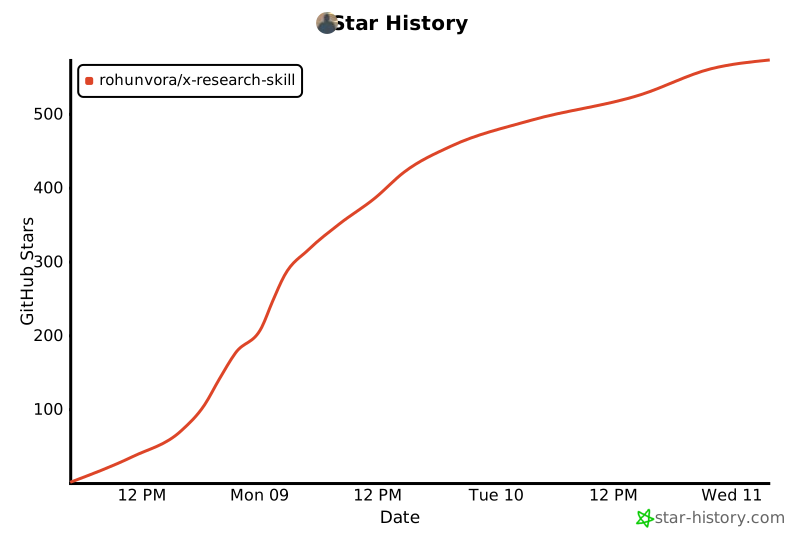
## Star History
[](https://star-history.com/#rohunvora/x-research-skill&Date)
## License
MIT
